Please note: This use case originates from the predecessor project PJ.10-W2-73 FCA as part of the SESAR2020 Programme and is not considered in the current project.
This Use Case describes the actions to be taken for changing from FCA to sectored ATC.
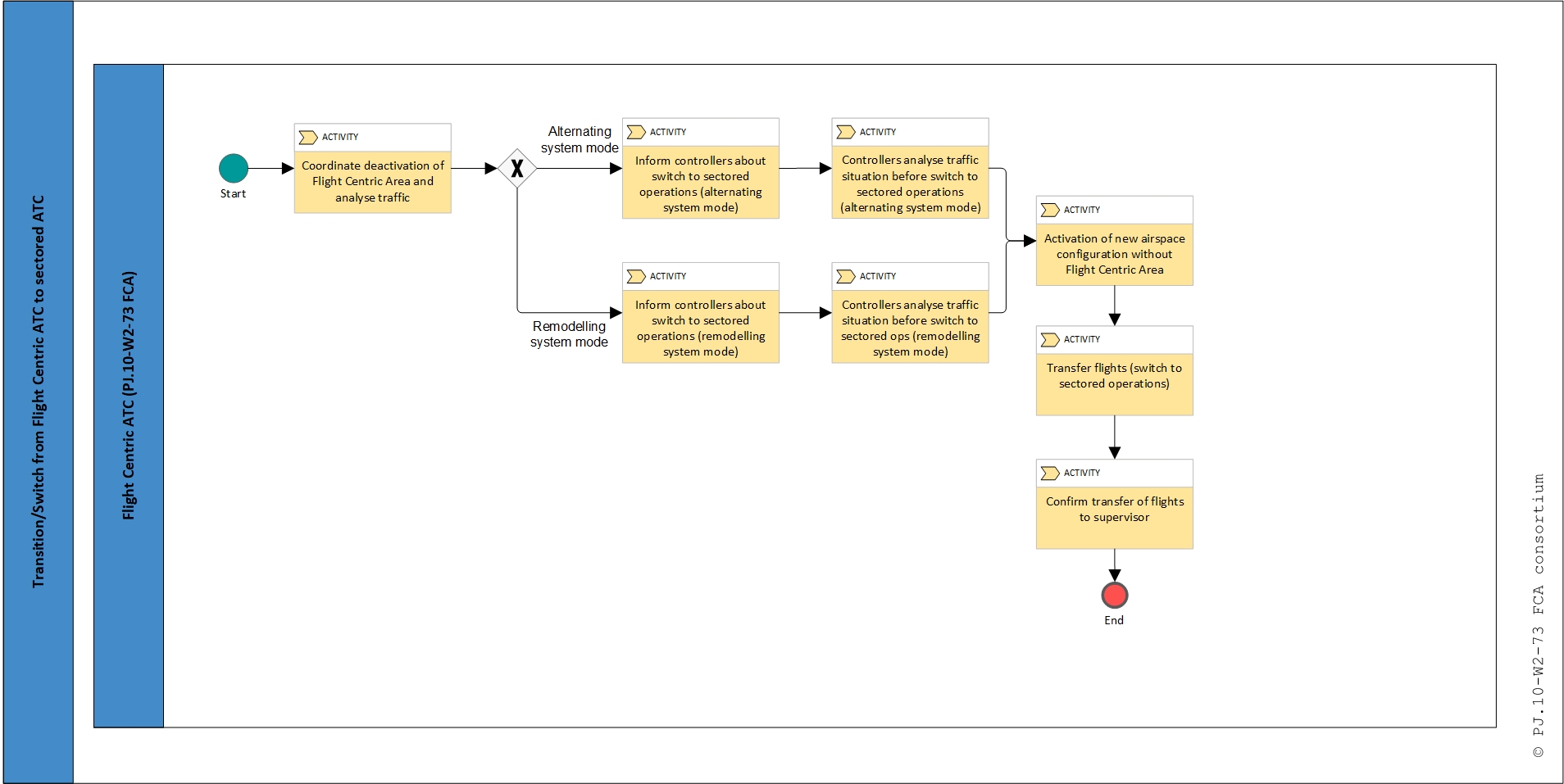
There are two modes for the transition/switch from Flight Centric ATC to sectored ATC operations: remodelling system mode and alternating system mode.
Alternating system mode: Two different controller teams control in conventional ATC and FCA. There are also two different CWP platforms (equipment) for the different modes.
Remodelling system mode: The same controller team controls in both conventional ATC and FCA. The CWP platform is prepared to change the mode in the same system.
Preconditions
Parameters or time are fulfilled to change from Flight Centric ATC to sectored ATC.
Postconditions: Success end state
Conventional mode of operation is applied in the defined airspace.
Postconditions: Failed end state
Conventional mode of operation is not applied in the defined airspace. Flight Centric mode of operations remains active.
Trigger
Local FMP monitors continuously the Entry Hourly Rate, Occupancy Counts and Complexity indicators in the Local Traffic Management Tool (Complexity Management Tool) in the airspace predefined for FCA operations. When the prediction is out of the defined thresholds and suitable for activation of the conventional sectored operations, he informs the supervisor in order to initiate the transition/switch procedure.
Main Flow
Alternating system mode
- The Local FMP coordinates with the Supervisor the deactivation of the Flight Centric Area returning to conventional sector configurations;
- The Supervisor confirms, at least 20 minutes in advance, the conventional sector configuration expected to be applied in the operational room as well as the related frequencies;
- The Supervisor (could also be performed by the Allocator) analyses the traffic situation and informs the Allocator (in case the Allocator is an own actor) about the traffic expected to be transferred to the new conventional sectors. In case Supervisor and Allocator are performed by the same actor, then he analyses the traffic situation through the allocation support function (shadow mode); The shadow mode can be shown in two different options:
- Visualize the shadow mode in the same screen when holding or clicking a button.
- Visualize the shadow mode in an additional screen.
- The Supervisor informs each of EC and PC from FCA and non-FCA positions about the new sector configuration expected to be applied and the new related frequencies as well as the traffic expected to be transferred to other positions;
- Before the activation of new airspace configuration (time horizons depend on local conditions), the non-FCA controllers that were not working when the FCA was opened, can analyse the traffic situation in their CWP (shadow mode) and if they have any doubt about the traffic situation, they can contact via hotline the corresponding controllers to clarify the problem and keep situational awareness;
- Supervisor activates the new airspace configuration with conventional sectors and Allocation support function is disconnected. In case the Allocator is not performed by the Supervisor he stops to work;
- As soon as possible, the impacted Flight Centric EC and PC controllers transfer the identified flights to the new conventional positions;
- All involved controllers confirm to the Supervisor that all expected traffic have been received.
Alternate flow
Remodeling system mode
Steps 1 to 2 are the same as in the Main Flow.
- The Supervisor (could also be performed by the Allocator) analyses the traffic situation through the allocation support function (shadow mode) which shows the traffic expected to be transferred to the new conventional sectors and informs the Allocator in case the Allocator is an own actor. The shadow mode can be shown in two different options:
- Visualize the shadow mode in the same screen when holding or clicking a button.
- Visualize the shadow mode in an additional screen.
- The Supervisor informs the Flight Centric ECs and PCs about
- the new sector configuration expected to be applied (if less controllers are required in conventional configuration, then some FCA positions will be closed),
- in case of SPO in FCA about the new controller teams in the new sector configuration,
- the new related frequencies,
- the traffic expected to be transferred to other positions.
- Before the activation of the new airspace configuration (time horizons depend on local conditions), the FCA controllers, which will be the same when the conventional mode will be opened, can analyse the traffic situation in their CWPs (shadow mode), in two different options:
- Visualize the shadow mode in the same screen when holding or clicking a button.
- Visualize the shadow mode in an additional screen when the Supervisor has communicated the switch.
and if they have any doubt about the traffic situation of other flights not assumed by them, but which will be under their responsibility after the switch, they can contact via hotline the corresponding controllers to clarify the problem and keep situational awareness. If new controllers are needed, they will be able to maintain the situational awareness and ask questions from their CWP in shadow mode (since they are not controlling).
- The Supervisor activates the new airspace configuration with conventional sectors and the Allocation support function is disconnected. In case the Allocator is not performed by the Supervisor he stops to work.
- As soon as possible, the impacted Flight Centric EC and PC controllers transfer the identified flights to the conventional positions (if required), and the remaining flights stay with the same controllers (now as conventional controllers).
- All involved controllers confirm to the Supervisor that all expected traffic have been received.